
It's a question we hear more and more: "we already have Copilot in Microsoft 365, do we really need to turn on Odoo AI too?" The honest answer: these aren't direct competitors, they're two tools that serve different needs. Here's how to tell them apart, so you avoid paying twice for the same thing, or, conversely, missing out on a real gain.
For a full overview of what Odoo AI covers, start with our complete Odoo AI guide.
How each one works, in one sentence
Microsoft Copilot is an office AI: it helps you write, summarize, and analyze inside Word, Excel, Outlook, and Teams, the tools where you produce content and communicate.
Odoo AI is a business AI: it acts directly on your operational data (your customers, invoices, stock, orders) inside your ERP.
The difference isn't about quality, it's about playing field. Copilot doesn't inherently know what a late order is in your management system. Odoo AI won't help you format a pivot table in Excel.
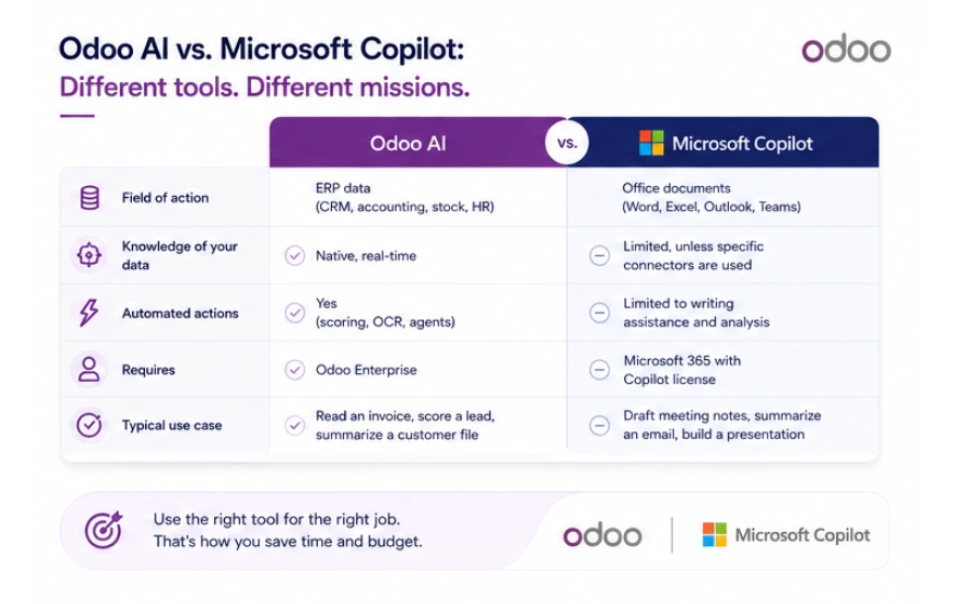
Detailed comparison
| Criterion | Odoo AI | Microsoft Copilot |
|---|---|---|
| Field of action | ERP data (CRM, accounting, stock, HR) | Office documents (Word, Excel, Outlook, Teams) |
| Knowledge of your business data | Native, real-time | Limited, unless specific connectors are used |
| Automated actions on your processes | Yes (scoring, OCR, agents) | Limited to writing assistance and analysis |
| Requires an existing subscription | Odoo Enterprise | Microsoft 365 with a Copilot license |
| Typical use case | Read an invoice, score a lead, summarize a customer file | Draft meeting notes, summarize an email, build a presentation |
When Odoo AI is clearly the right choice
If your need is directly tied to your business operations (processing vendor bills faster, prioritizing leads, automating a customer reply based on a case history) Odoo AI has a structural advantage: it sees your data in real time, with full context (amount, history, status), without you having to feed it manually.
Concrete examples: automatic vendor bill reading with Odoo AI eliminates re-keying from PDFs, and AI-powered CRM scoring ranks your hottest leads using live pipeline data. Copilot, in that scenario, would need to fetch the information from elsewhere (an Excel export, copy-pasting from Odoo), which reintroduces exactly the friction AI is supposed to remove.
When Copilot still earns its place, even with Odoo AI active
Copilot remains relevant for anything related to document production and internal communication: drafting meeting notes, formatting presentations, analyzing large Excel files that live outside Odoo, summarizing long email threads. These use cases don't disappear once Odoo AI is active, the two tools can coexist without real redundancy, as long as each stays on its own turf.
The trap to avoid: paying twice for the same thing
Some companies activate both Copilot AND Odoo's AI features without clarifying who does what, which creates confusion for teams ("which one do I use to draft this email?") and sometimes a double cost with no double benefit. Best practice: clearly define, per task type, which tool is the reference tool, and communicate it to teams rather than letting everyone pick at random. Our Odoo AI pricing guide helps you map what you're already paying for on the ERP side.
Do you need both, or is one enough?
For an SMB that runs most of its operations inside Odoo (sales, purchasing, accounting, support), Odoo AI delivers a more direct, more measurable gain, because it acts on the core of the business. Copilot becomes a relevant complement if your team produces a lot of office content outside the ERP (reports, client presentations, internal communication).
There's no universal rule: the right question to ask is "where is my team losing the most time today?" If the answer is "re-keying data or processing customer files", start with Odoo AI. If it's "writing documents and presentations", Copilot will have a more immediate impact.
A simple checklist if you're not sure
If you're still weighing the two, this short exercise helps: list the five tasks your team spends the most time on each week. For each one, ask whether the bottleneck is "finding or entering information already in our systems" or "writing something from scratch." The first category points toward Odoo AI, since it depends on live access to your business data. The second points toward Copilot, since it's about producing content.
Most teams find their list is a mix of both, which is normal, and confirms that the two tools are complementary rather than competing once the split is clear to everyone using them.
Frequently Asked Questions
Yes, both tools can coexist with no technical conflict. The key is clearly defining which tool serves which task to avoid confusing your teams.
No, Odoo AI isn't designed for classic office work. It acts on data and processes internal to Odoo.
Not natively in standard use. Specific connectors or integrations may exist depending on your setup, but that isn't the default behavior.
Odoo AI, if you're already on the Enterprise edition, it activates directly in the module settings with no separate license to negotiate.
It depends on where your team is losing the most time. For operations (invoices, CRM, support), Odoo AI is generally more directly profitable since it acts on already-structured data.
Not sure which one fits, or how they'd work together in your specific organization? Dasolo helps you clarify the split between your existing AI tools and Odoo AI. Let's talk about your setup →