
Since Odoo 18, and especially with Odoo 19, AI is no longer something you bolt on top of your ERP: it's built directly into the modules you already use. CRM, accounting, purchasing, HR, website, every application now ships with ready-to-use AI functions, no code and no third-party integration required.
The problem? Most companies running Odoo have never turned these features on. Some pay for capabilities they never use, others assume it takes a developer to benefit from them. It doesn't.
This guide covers Odoo AI end to end: what it actually is, what it can realistically do for your daily operations, what it can't do yet, and how to get started without breaking your existing setup.
What is Odoo AI, exactly?
Odoo AI groups together the artificial intelligence features natively built into Odoo Enterprise. In practice, that covers several building blocks:
- Ask AI: an assistant that answers natural-language questions about your data ("what's my revenue by region this quarter?") without you having to build a report manually.
- AI Agents: configurable assistants, trained on your own documents and processes, able to draft, summarize, or suggest actions inside a specific module.
- Smart document digitization (OCR): automatic reading of vendor bills, expense receipts, and purchase orders to create the matching records.
- Meeting transcription: recording, transcription, and automatic summary of your calls and meetings.
- AI-powered fields and actions in Studio: generate content or automations from a simple prompt, with no code.
- Writing assistance: emails, product descriptions, and support replies generated in one click across CRM, Sales, Website, and Helpdesk.
In short: Odoo AI isn't a single module to install, it's a layer that runs across nearly every application in the suite.
Why Odoo built it this way
Most competing ERP vendors offer AI as a separate layer, often priced separately and wired in through an API. Odoo took the opposite approach: build AI directly into the existing workflow. The result, no switching between two tools, no copy-pasting between an external chatbot and your ERP. The AI works with the data already sitting in your system, under the same access rights and the same business rules as the rest of Odoo.
This is an important distinction to understand before comparing Odoo AI to tools like Microsoft Copilot or generic assistants: Odoo AI is designed to act inside your ERP, not alongside it.
The use cases that actually save time
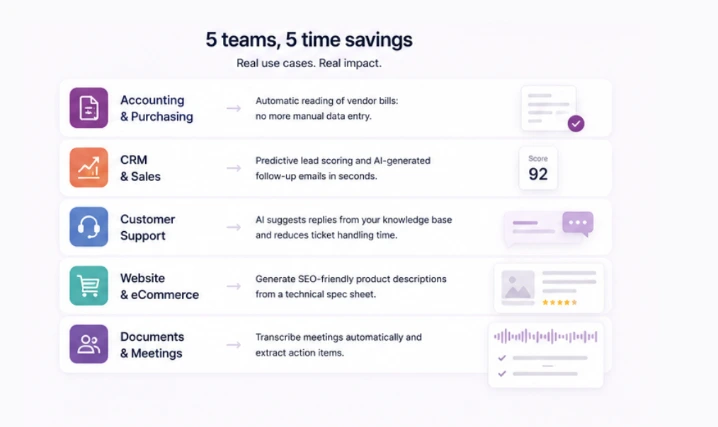
Here's where Odoo AI delivers a measurable gain, module by module:
Accounting and purchasing, automatic reading of vendor bills eliminates manual re-keying. A PDF or a photo is enough to generate the accounting entry, with the correct VAT lines and the correct vendor already recognized. For a deeper look at finance workflows, see our guide on Odoo AI for accounting.
CRM and sales, predictive lead scoring automatically identifies the prospects most likely to convert, and the AI can draft a first version of a personalized follow-up email in seconds. Learn more in our Odoo AI lead generation and CRM guide.
Customer support, replies to recurring tickets can be suggested automatically from your knowledge base, reducing average handling time.
Website and eCommerce, SEO-friendly product descriptions generated from a technical spec sheet, instead of starting from a blank page for every reference.
Documents and meetings, automatic transcription of meeting notes, with action items extracted for you.
What Odoo AI doesn't do (yet)
To stay credible, it's worth being honest about current limits. The standard assistant doesn't modify your database on its own initiative: it assists and suggests, but a human validates. Truly autonomous AI agents in Odoo, able to chain multiple actions without supervision, are arriving progressively with the latest versions and the native MCP server, but they aren't yet the default on every instance.
Another key point: Odoo AI is an Enterprise-edition feature. The free, open-source Community edition does not natively include it. If you're on Community and interested in AI, the question of moving to Enterprise (or integrating an external AI via API) comes before everything else. For a breakdown of licensing and costs, see our Odoo AI pricing guide.
How to get started without disrupting everything
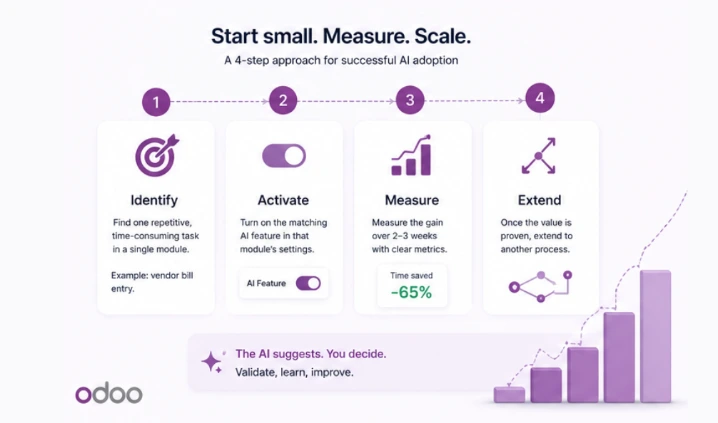
The right approach isn't to switch everything on at once. It means:
- Identify one repetitive, time-consuming task in a single module (vendor bill entry is often the best starting point, the gain is immediate and easy to measure).
- Turn on the matching feature in that module's settings. Our Odoo AI activation guide walks through each toggle step by step.
- Measure the gain over 2–3 weeks before extending to another process.
- Train your team to validate the AI's suggestions rather than accept them blindly: the AI proposes, the human decides.
This gradual approach avoids the classic disappointment: turning on ten features at once, measuring nothing, and concluding "AI doesn't work for us" when the real issue was the rollout. When you're ready to scale beyond a single module, our Odoo AI implementation guide covers the full rollout playbook.
Frequently Asked Questions
No. Features like Ask AI, invoice OCR, and writing assistance are activated from the settings, with no code required. More advanced automations go through Odoo Studio, also no-code.
Odoo AI relies on model providers such as OpenAI or Google Gemini, configured on the Odoo side. It isn't a direct plug-in of ChatGPT, but the end-user experience is similar.
Data passes through whichever model provider is configured in your settings. We recommend reviewing that provider's data handling terms and your internal access rights before activating features on sensitive data.
A generic chatbot answers general questions. Odoo AI works directly on your real ERP data (your customers, invoices, and stock) with the access rights of the logged-in user.
Want to know which Odoo AI features would actually be useful for your business? Dasolo, Odoo Gold Partner, audits your current setup and identifies the quick wins before any activation. Book a free audit →