
Of all the Odoo AI features, this one is probably the one with the fastest return on investment to demonstrate. Not because it's the most technologically impressive, but because the process it replaces (manual vendor bill entry) is universally present, universally repetitive, and a universal source of avoidable typos.
This guide focuses specifically on this use case, for teams who want a concrete, measurable starting point. For the broader accounting picture, see our Odoo AI accounting overview, or start with the complete Odoo AI guide if you're new to the topic.
What Odoo's smart OCR actually does
When a vendor bill arrives (by email, manual upload, or scan) the digitization module automatically reads the document and extracts structured information: vendor name, invoice number, date, amount before tax, VAT amount, payment due date. This information pre-fills the accounting entry or invoice draft directly in Odoo.
Unlike a classic OCR that simply turns an image into raw text, the AI understands the document's structure: it can distinguish a total from a subtotal, identify the correct date among several dates on the document (issue date, due date, delivery date), and automatically match the document to the correct vendor already recorded in your database.
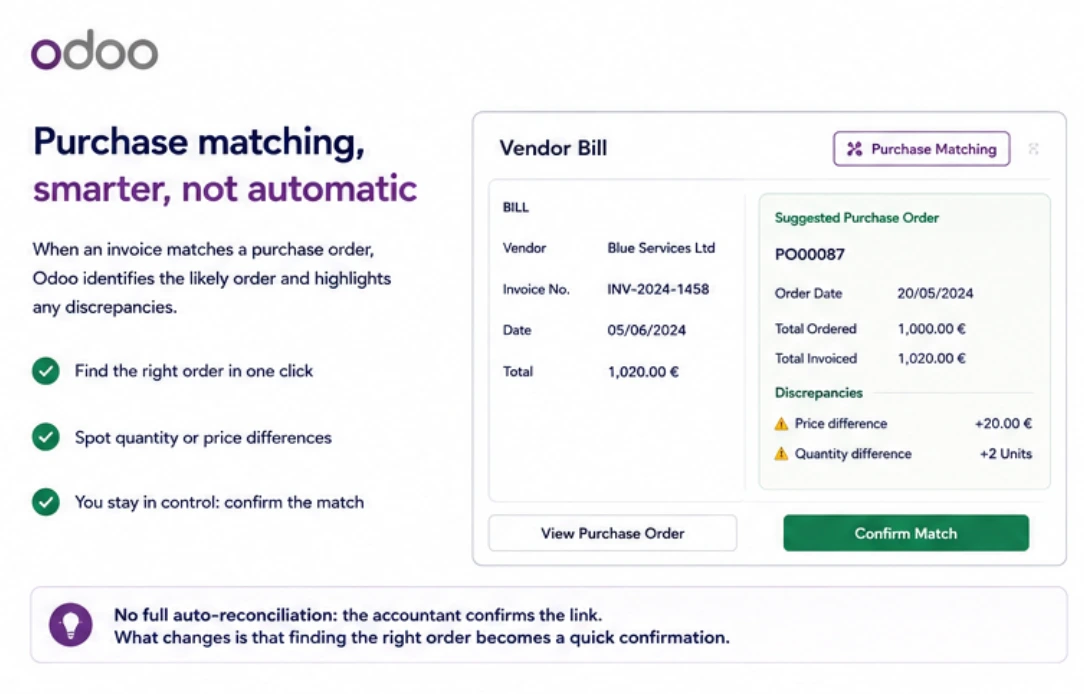
Matching with purchase orders, semi-automated
When an invoice matches a purchase order already in Odoo (common for recurring purchases), the system identifies the likely corresponding order and surfaces it through the Purchase Matching feature, flagging quantity or price discrepancies (e.g. delivered quantity different from ordered quantity). This isn't a fully hands-off automatic reconciliation: the accountant still opens the matching smart button and confirms the link. What changes is that identifying the right order becomes a quick confirmation instead of a manual search through open purchase orders, which normally takes several minutes per invoice.
Reliability in practice: what to know before you start
Recognition quality depends directly on source-document quality. A native PDF invoice, well structured, will be read with very good reliability. A poor-quality scan, a phone photo taken in bad lighting, or a handwritten invoice will give less reliable results and require more manual correction.
Practical recommendation: whenever possible, favor receiving vendor bills by email in PDF format rather than scanned paper mail. This is a simple change to request from your recurring vendors, and it directly improves automatic recognition reliability.
The real time savings, week after week
The gain isn't limited to initial entry time. Digitized vendor bill processing also impacts:
- Payment terms compliance, since invoices are processed faster upon receipt, reducing the risk of late-payment penalties or vendor friction.
- Cash flow tracking reliability, with payment due dates recorded up to date faster.
- Fewer duplicate entries, a classic issue in manual processes when two people process the same invoice received through two different channels.
When building the business case, factor in both time saved and error reduction. Our Odoo AI pricing guide helps you map license and consumption costs against that return.
How to set up the process, step by step
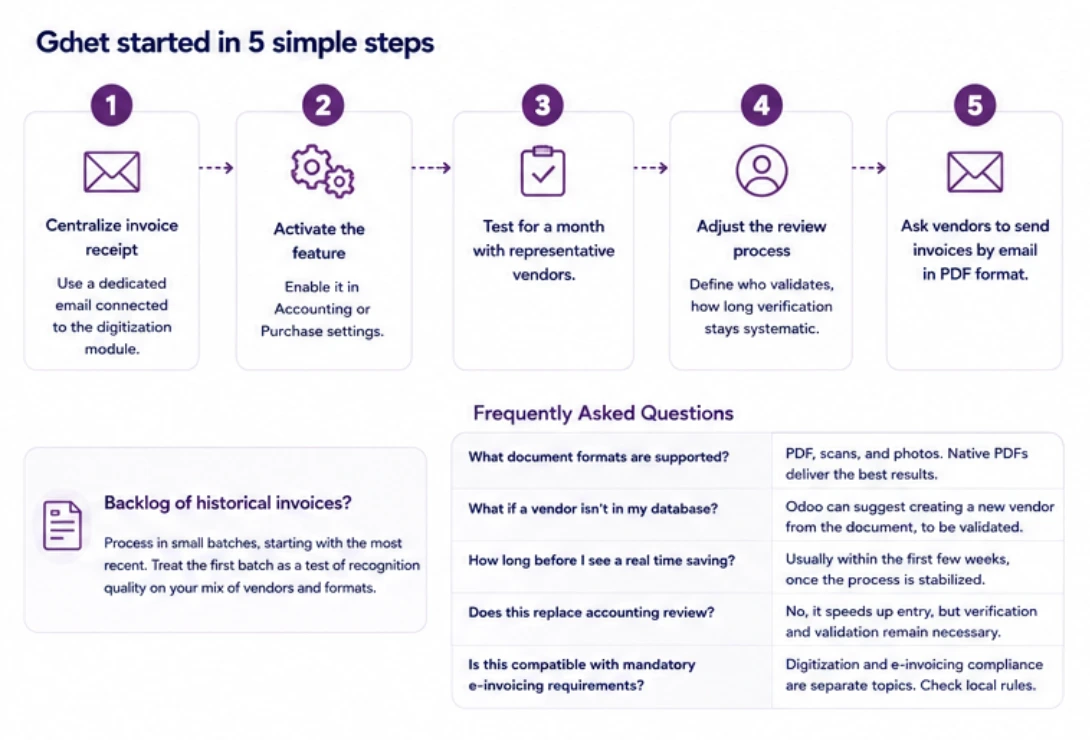
- Centralize invoice receipt on a dedicated email address connected to the digitization module.
- Activate the feature in the Accounting or Purchase settings.
- Test for a month with a sample of vendors representative of your usual volume.
- Adjust the review process: define who validates, at what level of control, and for how long verification stays systematic before being relaxed.
- Communicate the change to recurring vendors, asking them, where possible, to send invoices directly by email in PDF format.
For the full activation walkthrough across modules, see our Odoo AI activation guide.
What to do with your backlog of historical invoices
Digitization is most valuable going forward, on newly received invoices, but some teams also want to catch up on a backlog of older, unentered bills. It's worth treating this as a separate, deliberate decision rather than dumping the entire backlog into the digitization pipeline at once.
A more controlled approach: process the backlog in small batches, starting with the most recent invoices (most relevant for current cash flow and reporting), and treat the first batch as a test of recognition quality on your specific mix of vendors and document formats before committing to processing everything the same way.
Frequently Asked Questions
PDF, scanned images, and photos are generally supported, with higher reliability for well-structured native PDFs.
The system can propose creating a new vendor record from the information read on the document, to be validated manually.
The gain is generally visible within the first few weeks of use, once the review process is stabilized.
No, it speeds up entry, but verification and accounting validation remain necessary, especially during the rollout phase.
Smart digitization and e-invoicing regulatory obligations are two separate topics. Check your setup's compliance with the requirements in force in your country, which change regularly.
Want to know how many hours your accounting team could get back each month? Dasolo audits your current invoice volume and gives you a realistic time-saving estimate before any rollout. Request your invoicing audit →