
A rep juggling 80 leads at once can't give every one of them the same attention. It's not a lack of effort, it's a lack of prioritization: without a tool, everyone works leads in order of arrival, not in order of real potential. That's exactly what Odoo CRM's AI scoring fixes.
This article focuses on scoring and email drafting inside your existing pipeline, not on generating new leads. For the top-of-funnel side, see our Odoo AI lead generation guide. For the full picture across modules, start with the complete Odoo AI guide.
Predictive scoring: prioritize instead of guessing
Lead scoring in Odoo automatically assigns a conversion probability to each opportunity, based on the traits of past opportunities that closed as wins, industry, company size, lead source, engagement behavior, among other criteria available from your historical data.
In practice, this turns a flat list of leads into a list sorted by real potential. The rep starts their day with the 5 opportunities most likely to convert, instead of the 5 that arrived first in their inbox.
An important note on scoring reliability
Scoring becomes genuinely useful once you've built up enough history of won and lost leads in your database, a system starting with little historical data will produce less reliable scores at first. For a company with several months or years of CRM history already in Odoo, scoring can be activated immediately with a good confidence level. For a company just starting its CRM, it's better to plan for an observation phase before fully relying on it.
AI-assisted sales email drafting
Beyond scoring, writing assistance generates a first draft of a personalized email (a follow-up after a meeting, a reply to an inbound request, a check-in after a quote was sent) based on the context already available in the opportunity record (name, exchange history, products of interest). The rep then adjusts tone and details instead of starting from a blank page, meaningfully reducing time spent on repetitive emails without sacrificing personalization.
Unlike a generic office assistant, Odoo's drafting works directly from your CRM data, not from a blank Word document. If you're comparing tools, our Odoo AI vs Microsoft Copilot comparison explains where each one fits for sales teams.
Where CRM AI really changes the daily routine
In the morning, opening the pipeline: the rep immediately sees which opportunities deserve a priority call, without manually analyzing each record.
After a meeting: a summary or follow-up email can be drafted automatically from notes taken during the conversation, reducing the risk of missing the follow-up within the critical 24–48 hours after a hot lead.
On website leads: a first reply can be suggested automatically, cutting first-response time, a factor widely considered important for conversion in most sales processes.
These gains compound when combined with the right automations. Our guide on Odoo AI automations to activate first maps which CRM features deliver the fastest return.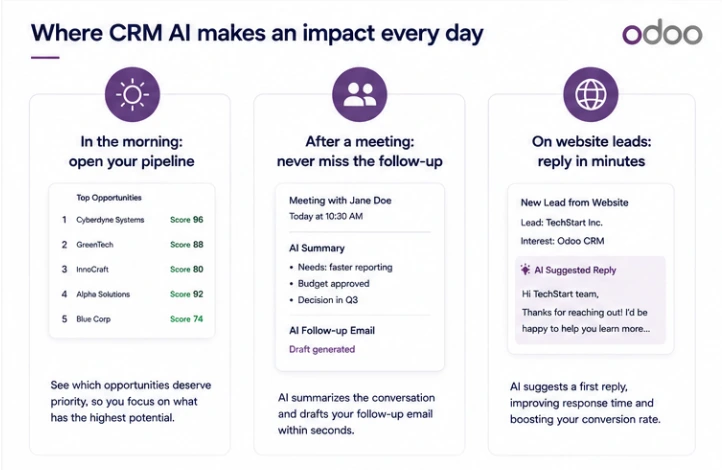
What AI doesn't do in CRM
AI doesn't replace the sales relationship itself. It doesn't negotiate, doesn't read non-verbal cues in a meeting, doesn't build trust over time. Its role is to free up time on mechanical tasks (prioritization, first drafts) so the rep can spend more of it on what actually matters: the conversation with the prospect.
One point worth communicating to sales teams: a low score doesn't mean "ignore it", it means "handle it with time proportional to the estimated potential". An experienced rep always keeps their own judgment on edge cases the score can't capture (a long-standing relationship with a client, a strong signal given in a meeting, etc.).
How to get started on CRM
- Activate predictive scoring in the CRM settings if your history of won/lost leads is sufficient (ideally several months of data).
- Test writing assistance on follow-up emails, the easiest use case to measure.
- Train the team to read the score as a prioritization tool, not an absolute grade.
- Track conversion rate and first-response time before/after over a quarter.
For the full activation walkthrough, see our Odoo AI activation guide.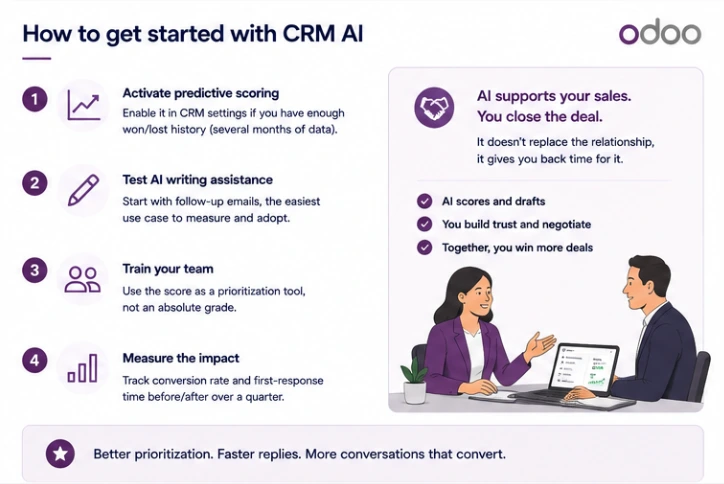
How to introduce this to your sales team without triggering resistance
Sales reps sometimes hear "AI in the CRM" and assume it means being monitored more closely, or that their judgment is being second-guessed. Framing matters here. Presenting the scoring feature as "here's a way to spend less time guessing which lead to call first" lands very differently from "the system will now tell you how to prioritize your day."
It also helps to be upfront that the score is a starting point, not a performance metric. If reps suspect that ignoring a low score will be held against them later, they'll either over-trust the score to protect themselves or ignore the tool altogether. Being explicit that experienced judgment still overrides the score on individual cases removes that ambiguity early.
Frequently Asked Questions
It works better with an existing CRM history. Without history, scores are less reliable at first and improve with time and data volume.
No by default, the AI proposes a draft that the rep reviews and adjusts before sending.
Yes, it relies on the criteria available in your CRM, including industry if that field is filled in on your records.
No, Odoo's scoring and writing assistance focus on prioritization and drafting, not complex multi-channel nurturing scenarios typical of dedicated marketing automation platforms.
No, even a small team saves time on prioritization and drafting, the gain scales with lead volume, not team size.
Want to check whether your CRM history is ready for reliable scoring? Dasolo reviews your current pipeline and tells you exactly what Odoo AI can bring to your sales team. Get your CRM reviewed →