
Flipping a toggle in the settings takes two minutes. Actually succeeding at an Odoo AI implementation that changes your team's daily work, without disrupting ongoing operations, takes a method. Here's what we see, project after project, that separates an activation that stays on paper from one that gets real adoption.
If you need the full landscape first, start with our complete Odoo AI guide. If you're ready to activate a first feature, our step-by-step activation guide covers the technical clicks.
Starting point: where are you really?
Before talking about AI, you need to look at the state of your current Odoo instance. Three very different situations call for three different approaches:
You're already on Enterprise, well configured, with clean data. In this case, activating AI features can be quick, most of the work is choosing priority use cases and training your teams.
You're on Enterprise but your setup has aged, with poorly configured modules or inconsistent data accumulated over the years. AI will amplify these inconsistencies before it fixes them. Cleaning up and resetting the configuration is a prerequisite for any serious AI activation.
You're still on Community. The question isn't "how do I activate AI" but "when and how do I migrate to Enterprise", which is a project of its own before AI even comes into play.
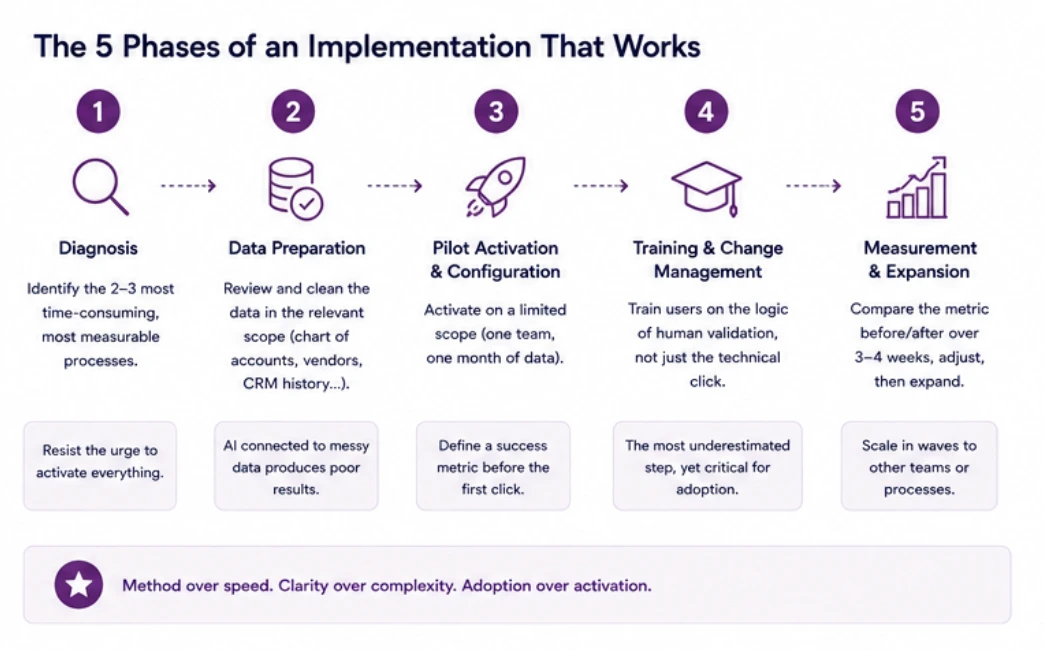
The 5 phases of an implementation that works
Phase 1, Diagnosis. Identify the 2–3 most time-consuming, most measurable processes in your current organization. This is the moment to resist the urge to "activate everything", spreading too thin is the number-one enemy of a successful rollout.
Phase 2, Data preparation. Review and clean the data in the relevant scope (chart of accounts, vendor records, CRM history). AI connected to messy data produces disappointing results, no matter how strong the technology.
Phase 3, Pilot activation and configuration. Activate the feature(s) on a limited scope (one team, one month of data), with a success metric defined before the very first activation click.
Phase 4, Training and change management. Train the relevant users on the logic of human validation, not just the technical click. This is the most commonly underestimated step, and yet the one that determines whether the tool is actually still being used six months later.
Phase 5, Measurement and expansion. Compare the metric defined in phase 1 before/after over 3–4 weeks, adjust if needed, then gradually extend to other teams or processes.
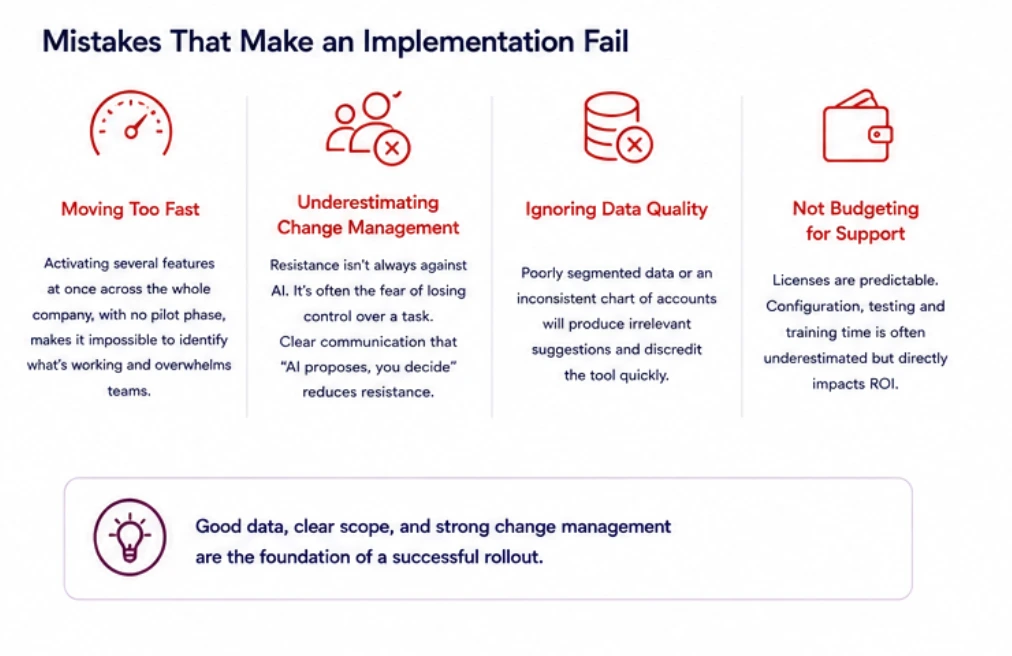
Mistakes that make an implementation fail
Moving too fast. Activating several AI features at once across the whole company, with no pilot phase, makes it impossible to identify what's actually working, and overwhelms teams with too many simultaneous changes, complicating training.
Underestimating change management. Resistance to change isn't always opposition to AI itself, it's often a fear of losing control over a task someone used to own fully. Clear communication that "AI proposes, you decide" defuses a large part of that resistance.
Ignoring the quality of starting data. This is the most frequent technical mistake. A poorly segmented customer database or an inconsistent chart of accounts will produce low-relevance AI suggestions, which discredits the tool within the first few weeks, sometimes irreversibly in users' minds.
Not budgeting for support. The license is a fixed, predictable cost. Configuration, testing, and training time is often underestimated in initial budgets, even though it directly determines the return on investment.
How much time to realistically plan for
For a first, well-targeted use case (for example, vendor bill digitization for a 2–3 person accounting team), a full implementation (diagnosis, data preparation, activation, training, measurement) typically runs over 3 to 6 weeks. A broader rollout across several departments naturally spans several months, in successive waves rather than as a single, monolithic project.
Why external support often makes the difference
An implementation run entirely in-house, with no prior experience on similar projects, generally takes longer and involves more trial and error, not a problem in itself, but one that has a real cost in team time. A partner who has already run several similar implementations spots high-potential use cases faster, anticipates pitfalls tied to data quality, and structures team training in a way that maximizes real adoption, not just technical activation.
Questions to ask a potential implementation partner
If you're evaluating outside support for the rollout, a few direct questions help separate a partner who understands change management from one who only understands the technical activation steps:
- Can they describe a past project where the first attempt didn't work, and what they changed?
- Do they propose a pilot scope with a measurable indicator before talking about a full rollout?
- Do they ask about your team's current data quality before recommending which features to activate first?
- Is training your team part of the engagement, or only the technical configuration?
A partner who can't answer these clearly is likely to treat the project as a one-time technical task rather than the change-management process it actually is, which is the difference that shows up six months later in whether the tool is still being used.
Frequently Asked Questions
For a first, targeted use case, generally 3 to 6 weeks. A full rollout across several departments extends over several months in successive phases.
No, a well-run implementation happens alongside normal operations, on a limited pilot scope before expansion.
Yes, that's possible if you already have a strong grasp of your Odoo configuration. External support generally speeds up the process and reduces costly configuration mistakes.
This is often a sign of a poorly chosen pilot scope or insufficiently prepared starting data. Adjusting the scope or doing additional data cleanup usually fixes the issue without starting over.
No, the recommended approach is gradual: a measured pilot scope, then expansion in successive waves to other departments.
Planning an Odoo AI implementation and want to avoid the classic pitfalls? Dasolo, Odoo Gold Partner, supports the full implementation: diagnosis, data preparation, activation, and team training. Talk to our team →