
Accounting is, module by module, where Odoo's AI delivers the fastest and easiest-to-measure gain. Not because it's the most sophisticated module, but because the task it automates (manual re-keying of invoices) is repetitive, time-consuming, and inherently error-prone.
Here's specifically what that changes in an accounting team's daily work. For the broader picture on how AI fits across finance workflows, see our overview of Odoo AI for accounting, or start with the complete Odoo AI guide if you're new to the topic.
The problem it solves: manual re-keying
In an SMB with no automation, every vendor bill follows the same path: received by email or mail, opened, read, then manually entered (vendor, amount, VAT, accounting account) then reconciled against the purchase order or the goods receipt. Across dozens of invoices a week, that time adds up fast, and it's time that adds zero value, only typo risk.
How smart digitization works
Odoo's document digitization feature automatically reads the content of an invoice (PDF, scan, or photo) and pre-fills the matching accounting entry: vendor, date, amount before tax, VAT, reference. The user just needs to review and confirm, instead of typing everything from a blank form. For a step-by-step breakdown of vendor bill OCR specifically, see our deep-dive on vendor bill OCR.
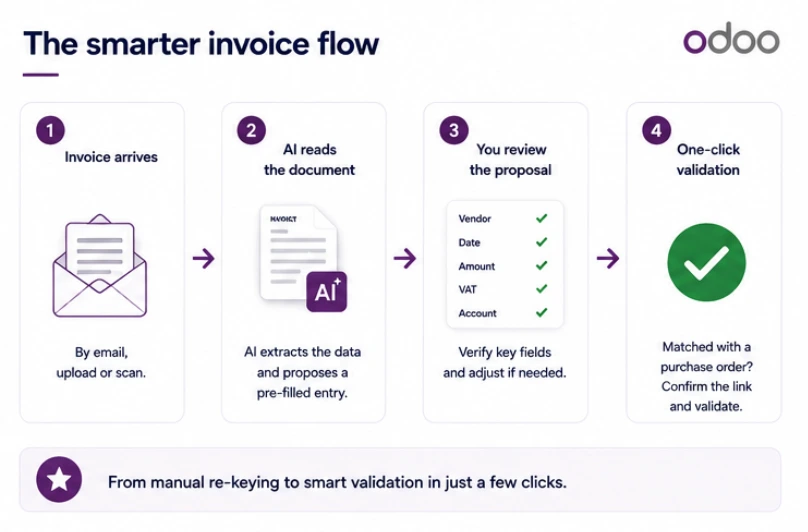
In practice, the flow becomes:
- The invoice arrives (email, manual upload, or scan).
- The AI reads the document and proposes a pre-filled entry.
- The accountant reviews the proposed fields (especially the accounting account and VAT during the first weeks).
- One-click validation. If a corresponding purchase order already exists in Odoo, the system can flag it and suggest the match via the Purchase Matching feature, the accountant confirms the link rather than it happening with zero interaction.
Assisted reconciliation: the step people often forget
Beyond entry, matching invoices with payments (reconciliation) also benefits from AI assistance, identifying likely matches between a bank statement line and a pending invoice, even when the bank label doesn't exactly match the vendor name. This is often under-used, even though it saves significant time at month-end during bank reconciliation.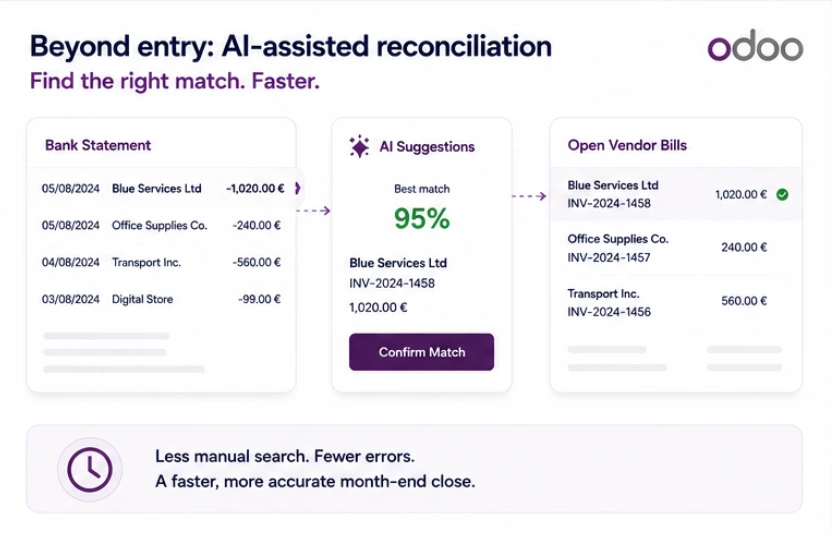
What doesn't change: human oversight is still needed
An important point to communicate to your accounting team: the AI proposes an entry, it doesn't finalize it in your place. During the first weeks of use, it's recommended to keep systematic verification of the proposed accounting account, particularly for recurring vendors whose invoices vary in nature (the same vendor might bill both equipment and services, for example, with different accounts).
Once reliability has been confirmed over several weeks, the level of oversight can be adjusted, but it's not a "full trust" checkbox from day one.
The real gain for an accounting team
The benefit isn't limited to entry time. By reducing typos and speeding up processing, the accounting team also gains on:
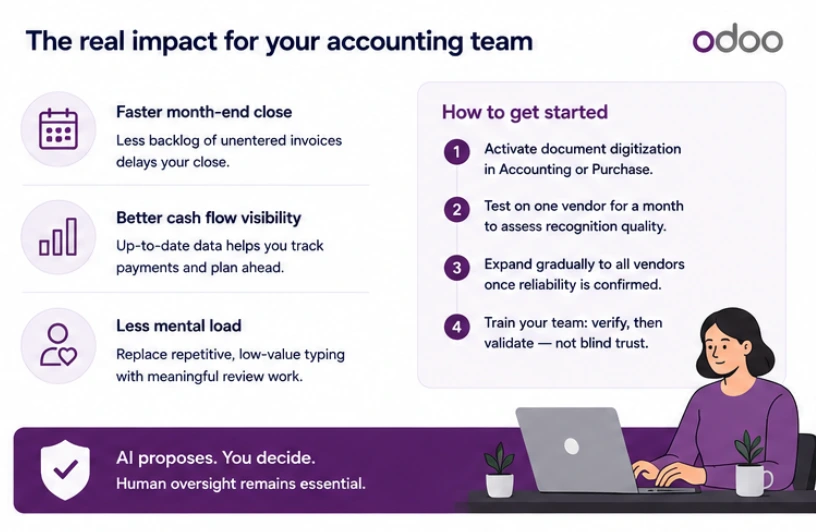
- Month-end close, less delayed by pending invoice entries.
- Cash flow visibility, with up-to-date data available faster for tracking vendor payments.
- Mental load, by replacing a repetitive, low-value task with a review task that's faster and less tiring.
How to get started on this specific module
- Activate document digitization in the Accounting or Purchase module settings.
- Test on a month of invoices from a single recurring vendor to assess recognition quality.
- Expand gradually to all vendors once reliability is confirmed.
- Train the team on the "verify then validate" logic, not "blind trust and confirm".
For the full activation walkthrough across modules, see our Odoo AI activation guide.
What changes on your month-end checklist
Digitization doesn't remove the need for a month-end close process, but it changes what that process looks like. Instead of spending the first days after month-end catching up on a backlog of unentered invoices, the accounting team's month-end work shifts toward reviewing exceptions: bills the AI flagged as uncertain, new vendors that needed manual setup, or entries where the suggested account didn't match expectations.
It's worth updating your internal close checklist to reflect this shift explicitly, rather than assuming the old checklist still applies unchanged. A checklist item like "review AI-flagged exceptions from the past month" is more useful at this stage than "enter all pending vendor bills", since the entry step itself is no longer the bottleneck.
Frequently Asked Questions
Yes, which is why verification is still recommended, especially on poor-quality documents (blurry scans, handwritten invoices). Reliability improves with well-scanned, legible documents.
No, the AI relies on your existing chart of accounts in Odoo to propose matching accounts.
Yes, that's actually the most common use case: invoices received by email can be forwarded automatically to the digitization module.
No, it speeds up identifying likely matches, but human validation is still needed, especially for ambiguous cases.
No, smart document digitization is part of the features reserved for the Enterprise edition.
Want to know how much time your accounting team could actually save? Dasolo runs a quick audit of your vendor bill process and shows you the real gain before activation. Request your audit →